

Introduction: Why This Guide Exists
A few years ago, I walked into a node js interview questions and answers session completely underprepared. I had been building things with Node.js for about eight months by learning node js tutorial online — CRUD APIs, a small chat app, some automation scripts — and I genuinely thought hands-on experience was enough. It wasn’t. The interviewer asked me what the event loop actually does, and I stumbled. I knew of it, but I couldn’t explain it clearly under pressure. I didn’t get that job.
That experience pushed me to study Node.js from the ground up, not just use it. This article is what I wish I’d had before that interview. It’s built for everyone: the beginner who’s still figuring out node js what is all about, someone actively going through a node js tutorial, a developer who just did a fresh node js windows install and is looking to learn fast, and the seasoned engineer prepping for nodejs interview questions for experienced roles.
Let’s get into all 50 questions.
Node js Interview Questions / Nodejs Interview Questions
Part 1: Foundational Concepts — Node JS What Is
Q1. What is Node.js and why does it matter?
If you’ve ever wondered node js what is really about, here’s the clearest answer: Node.js is a server-side JavaScript runtime built on Google Chrome’s V8 JavaScript engine. Before Node.js existed, JavaScript only ran in the browser. Ryan Dahl changed that in 2009 by embedding V8 into a C++ program and adding I/O capabilities — and the entire backend JavaScript ecosystem was born.
Understanding node js what is at its core means understanding three things:
- Non-blocking, event-driven I/O — Node.js doesn’t wait around for file reads, database queries, or HTTP calls to finish. It moves on and comes back when the work is done.
- Single-threaded but highly concurrent — One thread handles thousands of connections efficiently via the event loop.
- JavaScript everywhere — The same language on both frontend and backend reduces context switching and unifies your team’s skillset.
Real-world analogy: Imagine a restaurant with one brilliant waiter (Node.js) who takes your order, hands it to the kitchen, then immediately serves the next table — rather than standing at your table waiting for the food. That’s non-blocking I/O in action.
// Traditional blocking style (NOT how Node.js works):
const data = readFileSync('bigfile.txt'); // Freezes here until done
console.log(data);

// Non-blocking Node.js style:
fs.readFile('bigfile.txt', (err, data) => {
  console.log(data); // Called when ready — doesn't block anything
});
console.log('This runs IMMEDIATELY, before the file is even read!');
Q2. What is the V8 Engine?
V8 is an open-source JavaScript engine developed by Google, written in C++. It compiles JavaScript directly to native machine code instead of interpreting it line-by-line. Node.js uses V8 as its runtime engine, which is a big reason Node.js is so fast compared to traditional interpreted runtimes.
Q3. What is the difference between Node.js and JavaScript?
This is one of the most common nodejs interview questions for beginners — and it trips up more people than you’d expect.
| Feature | JavaScript | Node.js |
|---|---|---|
| Where it runs | Browser | Server |
| Access to DOM | Yes | No |
| File system access | No | Yes (via fs module) |
| HTTP server | No | Yes (via http module) |
| Package manager | No built-in | npm / yarn |
| Global object | window | global / globalThis |
JavaScript is the language. Node.js is the environment that lets you run that language on a server. Think of JavaScript as a recipe and Node.js as the kitchen where it gets cooked.
Q4. What is NPM and how does it relate to Node.js?
npm (Node Package Manager) ships bundled with Node.js. It’s the world’s largest software registry with over 2 million packages. Every serious node js tutorial will introduce npm early because it’s essential to every real project.
npm init -y                # Initialize a new project (creates package.json)
npm install express        # Install a dependency
npm install -D nodemon     # Install as a dev-only dependency
npm run start              # Execute a script from package.json
npm uninstall lodash       # Remove a dependency
npm list --depth=0         # See all top-level dependencies
Pro tip: Always commit your package.json and package-lock.json. Never commit node_modules — add it to .gitignore.
Q5. How do you perform a node js windows install?
For anyone who needs to do a node js windows install, here are the two best methods in 2025:
Method 1: Official Installer (Simplest)
- Visit nodejs.org
- Download the LTS (Long Term Support) version — always use LTS for anything serious.
- Run the
.msiinstaller and follow the prompts (default settings are fine). - Open Command Prompt or PowerShell and verify:
node --version    # e.g., v22.3.0
npm --version     # e.g., 10.5.0
Method 2: NVM for Windows (Recommended for developers)
NVM (Node Version Manager) is the smarter way to do a node js windows install if you work on multiple projects, because it lets you switch Node.js versions instantly.
# After installing nvm-windows from GitHub:
nvm install 22.3.0
nvm use 22.3.0
nvm list             # Shows all installed versions
nvm install lts      # Install the current LTS automatically
Why NVM beats the installer: Many projects use different Node.js versions. NVM lets you switch with a single command instead of reinstalling. If you’ve done a node js windows install the old way before and ran into permission errors with npm install -g, NVM eliminates that problem entirely.
Q6. What is the node js updated version strategy (LTS vs Current)?
A very common question in any node js tutorial — which version should you use? Node.js follows a predictable release cycle:
- Even-numbered versions (18, 20, 22) → become LTS (Long Term Support). These receive security and bug fixes for 30 months. Use these for production.
- Odd-numbered versions (19, 21, 23) → Current releases with cutting-edge features. These expire quickly (6 months). Avoid in production.
Knowing the node js updated version schedule helps you plan upgrades without surprises:
| Version | Status | End of Life |
|---|---|---|
| Node.js 20 | Maintenance LTS | April 2026 |
| Node.js 22 | Active LTS ✅ | April 2027 |
| Node.js 23 | Current (Dev only) | June 2025 |
Rule of thumb for any node js updated version decision: Use the latest Active LTS for new projects, and check nodejs.org/en/about/previous-releases before planning major upgrades.
# Always check your current version
node --version

# With NVM, switching to the latest node js updated version is instant:
nvm install 22
nvm use 22
Part 2: The Event Loop — The Heart of Node.js
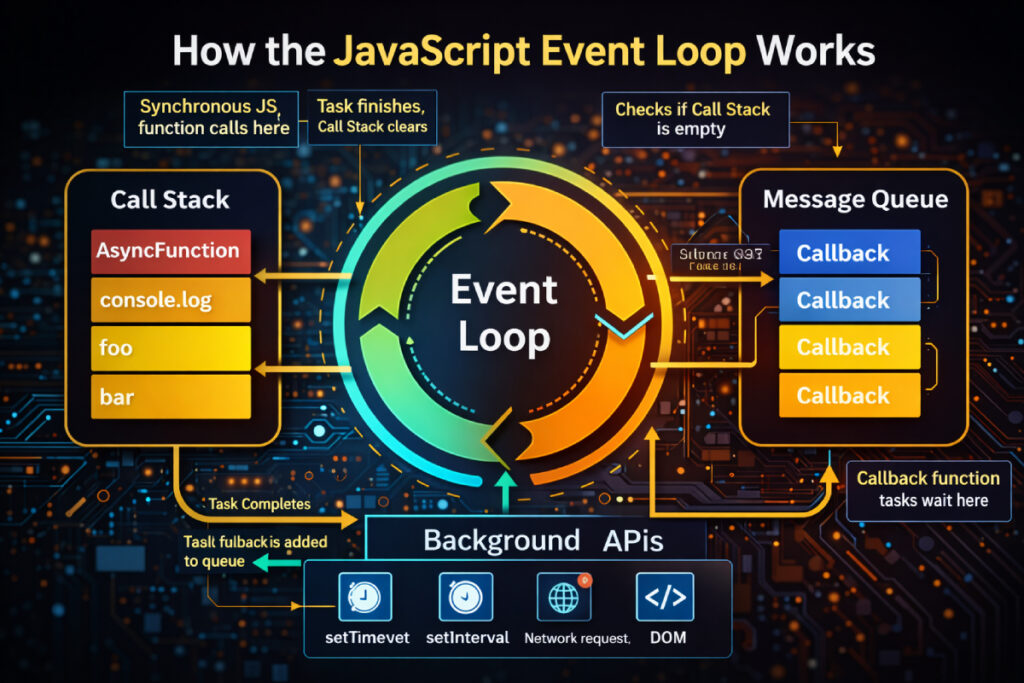
Q7. What is Event Loop in node js?
This is the single most important concept in Node.js — every senior engineer prepping for nodejs interview questions for experienced positions must be able to explain this clearly.
The event loop is what allows Node.js — a single-threaded runtime — to handle thousands of concurrent operations without blocking. Here’s how it works:
Node.js runs your JavaScript on one thread. When it encounters an async operation (reading a file, making an HTTP request, querying a database), it hands that work off to the OS kernel or a libuv thread pool. The main thread keeps executing. When the async work completes, a callback is placed in a queue. The event loop picks it up when the call stack is empty.
   ┌──────────────────────────────┐
   │       Your JS Code           │
   │        (Call Stack)          │
   └─────────────┬────────────────┘
                 │
   ┌─────────────▼────────────────┐
   │         Event Loop           │
   │  Phases: timers → poll →     │
   │  check → close callbacks     │
   └─────────────┬────────────────┘
                 │
   ┌─────────────▼────────────────┐
   │     Callback / Task Queue    │
   │  (I/O, timers, setImmediate) │
   └──────────────────────────────┘
The six phases of the event loop:
- Timers — executes
setTimeoutandsetIntervalcallbacks - Pending callbacks — I/O errors deferred to the next iteration
- Idle, prepare — internal Node.js use only
- Poll — retrieves new I/O events; executes I/O callbacks
- Check — executes
setImmediatecallbacks - Close callbacks — e.g.,
socket.on('close', ...)
Q8. What is the difference between setTimeout, setImmediate, and process.nextTick?
One of the classic node js coding interview questions — understanding execution order:
setTimeout(() => console.log('setTimeout'), 0);
setImmediate(() => console.log('setImmediate'));
process.nextTick(() => console.log('nextTick'));

// Output:
// nextTick       ← runs before the next event loop phase (microtask queue)
// setTimeout     ← runs in Timers phase
// setImmediate   ← runs in Check phase
process.nextTick: Fires before the next event loop iteration — highest priority among async callbacks. Use sparingly.setImmediate: Fires in the Check phase of the current event loop iteration.setTimeout(fn, 0): Fires in the Timers phase — not truly “immediate” despite the 0ms delay.
Common mistake: Overusing process.nextTick can starve the event loop and block I/O callbacks from ever running.
Q9. What is libuv?
libuv is the C library that powers Node.js’s async capabilities under the hood. It provides:
- The event loop implementation
- A thread pool (default: 4 threads) for CPU-bound operations — file system tasks, DNS lookups, crypto
- Cross-platform async networking (so Node.js works the same on Linux, macOS, and Windows)
You never interact with libuv directly, but understanding it explains how Node.js achieves true parallelism under the hood despite being single-threaded at the JavaScript level.
// You can increase the thread pool size for heavy workloads:
process.env.UV_THREADPOOL_SIZE = 8; // Set before any async operations
Q10. Is Node.js truly single-threaded?
Partially yes. Your JavaScript code runs on a single thread. But Node.js uses libuv’s thread pool (4 threads by default) for:
- File system operations
- DNS lookups
- Crypto and compression (zlib)
Network I/O (HTTP, TCP) is handled asynchronously by the OS kernel itself — no thread pool involved. This is the secret behind Node.js’s ability to handle tens of thousands of concurrent connections on modest hardware.
Part 3: Modules and File System
Q11. What are CommonJS modules vs ES Modules?
Understanding both module systems is a must for any nodejs interview questions session in 2025, since many codebases are mid-migration.
CommonJS (CJS) — the original Node.js module system:
// math.js
module.exports = {
  add: (a, b) => a + b,
  subtract: (a, b) => a - b
};

// app.js
const { add } = require('./math');
console.log(add(2, 3)); // 5
ES Modules (ESM) — the modern JavaScript standard:
// math.mjs (or set "type": "module" in package.json)
export const add = (a, b) => a + b;
export const subtract = (a, b) => a - b;

// app.mjs
import { add } from './math.mjs';
console.log(add(2, 3)); // 5
Key differences:
| CommonJS | ES Modules | |
|---|---|---|
| Syntax | require / module.exports | import / export |
| Loading | Synchronous | Asynchronous |
| Default in Node.js | Yes | Needs "type": "module" or .mjs |
| Tree-shakeable | No | Yes |
Top-level await | No | Yes |
Q12. What is the fs module?
The fs (File System) module is how Node.js interacts with the file system. Every node js tutorial covers this because it’s one of the most-used built-in modules.
const fs = require('fs');
const fsPromises = require('fs/promises');

// ❌ Synchronous (blocks the event loop — never use in a server)
const data = fs.readFileSync('file.txt', 'utf8');

// ✅ Callback-based (older style)
fs.readFile('file.txt', 'utf8', (err, data) => {
  if (err) throw err;
  console.log(data);
});

// ✅ Promise-based (modern, preferred)
async function readFile() {
  try {
    const data = await fsPromises.readFile('file.txt', 'utf8');
    console.log(data);
  } catch (err) {
    console.error('Failed to read file:', err.message);
  }
}
Performance tip: Always use async file operations in servers. readFileSync blocks the entire event loop for every concurrent user — under load, this becomes catastrophic.
Q13. What is the path module?
The path module handles file paths in a cross-platform way — essential when your code runs on both Windows and Linux.
const path = require('path');

path.join('/users', 'john', 'docs');   // '/users/john/docs'
path.resolve('src', 'app.js');         // Absolute path from CWD
path.basename('/users/john/file.txt'); // 'file.txt'
path.extname('index.html');            // '.html'
path.dirname('/users/john/file.txt');  // '/users/john'
path.sep;                              // '/' on Unix, '\\' on Windows
Why it matters: String concatenation for paths ('/users/' + name + '/file') breaks on Windows (backslashes). path.join() handles this automatically.
Part 4: Asynchronous JavaScript in Node.js
Q14. Explain callbacks, Promises, and async/await.
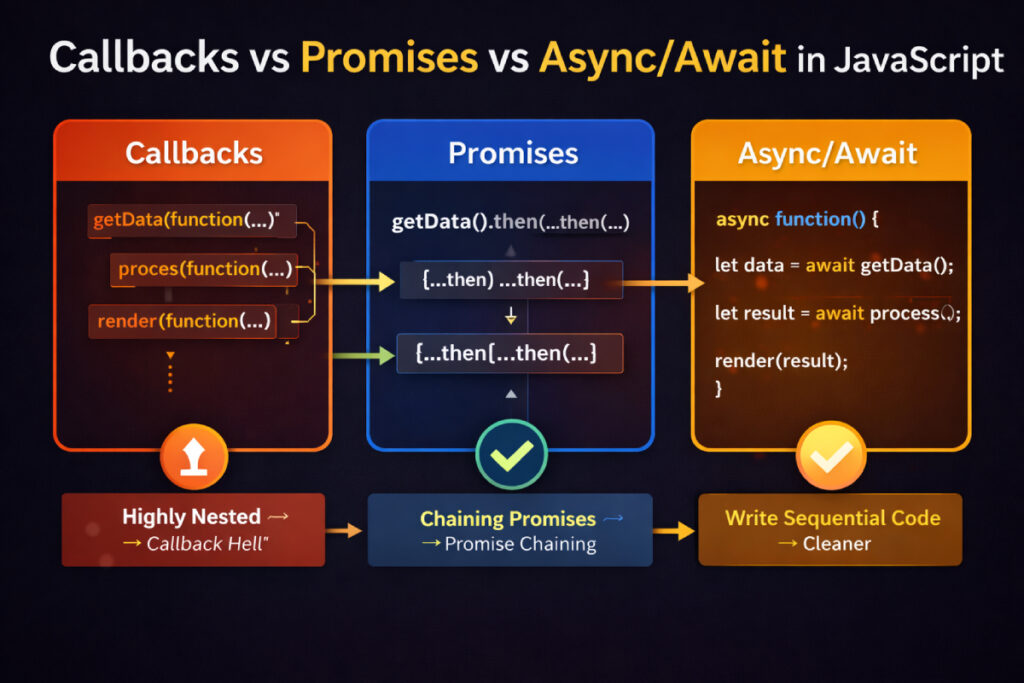
This is one of the most foundational node js interview questions and answers topics — and it shows up in almost every interview regardless of experience level.
Callbacks (old way — leads to “callback hell”):
getUserById(id, (err, user) => {
  if (err) return handleError(err);
  getPostsByUser(user.id, (err, posts) => {
    if (err) return handleError(err);
    formatPosts(posts, (err, formatted) => {
      if (err) return handleError(err);
      // Now we're 3 levels deep — imagine 6 levels
    });
  });
});
Promises (cleaner chaining):
getUserById(id)
  .then(user => getPostsByUser(user.id))
  .then(posts => formatPosts(posts))
  .catch(err => handleError(err))
  .finally(() => console.log('Done'));
Async/Await (cleanest — reads like synchronous code):
async function getUserPosts(id) {
  try {
    const user = await getUserById(id);
    const posts = await getPostsByUser(user.id);
    const formatted = await formatPosts(posts);
    return formatted;
  } catch (err) {
    handleError(err);
  }
}
The most common async mistake (from real code reviews):
// ❌ WRONG — await inside forEach does NOT wait
items.forEach(async (item) => {
  await processItem(item); // This fires all at once!
});

// ✅ CORRECT — Sequential execution
for (const item of items) {
  await processItem(item);
}

// ✅ CORRECT — Parallel execution
await Promise.all(items.map(item => processItem(item)));
Q15. What is Promise.all, Promise.race, Promise.allSettled, and Promise.any?
A favourite among node js coding interview questions at mid-to-senior levels:
const p1 = fetchUser(1);   // Resolves in 200ms
const p2 = fetchPosts(2);  // Resolves in 300ms
const p3 = fetchTags(3);   // Rejects after 100ms

// Promise.all — waits for ALL. Rejects if ANY rejects.
const [user, posts, tags] = await Promise.all([p1, p2, p3]);

// Promise.race — resolves/rejects with the FIRST settled promise
const fastest = await Promise.race([p1, p2, p3]);

// Promise.allSettled — waits for ALL, never throws, gives status for each
const results = await Promise.allSettled([p1, p2, p3]);
// [{ status: 'fulfilled', value: ... }, { status: 'rejected', reason: ... }]

// Promise.any — first to RESOLVE wins; rejects only if ALL reject
const first = await Promise.any([p1, p2, p3]);
Practical use: Fetch user data and their posts in parallel (cuts wait time in half):
const [user, posts] = await Promise.all([getUser(id), getPosts(id)]);
Q16. What are Streams in Node.js?
Streams are one of Node.js’s most powerful — and most underused — features. Instead of loading an entire file or response into memory, streams process data in chunks.
Four stream types:
- Readable — source of data (file read, HTTP request body)
- Writable — destination for data (file write, HTTP response)
- Duplex — both readable and writable (TCP socket)
- Transform — modifies data as it passes through (gzip, encryption)
const fs = require('fs');

// ❌ Without streams — loads the ENTIRE file into RAM
const data = fs.readFileSync('10gb-video.mp4'); // Crashes on large files

// ✅ With streams — processes chunk by chunk, constant memory usage
const readStream = fs.createReadStream('10gb-video.mp4');
const writeStream = fs.createWriteStream('output.mp4');
readStream.pipe(writeStream);
Serving large files over HTTP — always use streams:
app.get('/download/:filename', (req, res) => {
  const filePath = path.join(__dirname, 'uploads', req.params.filename);
  const fileStream = fs.createReadStream(filePath);
  fileStream.pipe(res); // Memory-efficient — streams directly to the client
});
Part 5: Node JS With Express
Q17. What is Express.js and why use it?
If you’re studying node js with express, here’s the essential context: Express is a minimal, unopinionated web framework for Node.js. It wraps Node’s built-in http module and adds routing, middleware, and a clean API for building web apps and REST APIs.
Without Express, even simple routing is verbose:
// Pure Node.js http — works but painful at scale
const http = require('http');
const server = http.createServer((req, res) => {
  if (req.url === '/users' && req.method === 'GET') {
    res.writeHead(200, { 'Content-Type': 'application/json' });
    res.end(JSON.stringify({ users: [] }));
  } else if (req.url === '/users' && req.method === 'POST') {
    // parse body manually...
  }
  // Gets ugly fast
});
With node js with express, the same thing is clean and readable:
const express = require('express');
const app = express();

app.use(express.json()); // Parse JSON bodies automatically

app.get('/users', async (req, res) => {
  const users = await User.find();
  res.json({ users });
});

app.post('/users', async (req, res) => {
  const user = await User.create(req.body);
  res.status(201).json({ user });
});

app.listen(3000, () => console.log('Server running on port 3000'));
Why Express remains dominant for node js with express development in 2025: It’s minimal enough to stay out of your way, mature enough to have solutions for every problem, and its middleware ecosystem (passport, helmet, morgan, etc.) saves hundreds of hours.
Q18. What is middleware in Express?
Middleware functions sit between the incoming request and the final route handler. They have access to req, res, and next. This is one of the most-tested concepts in any node js interview questions and answers session.
// Logger middleware
function logger(req, res, next) {
  console.log(`[${new Date().toISOString()}] ${req.method} ${req.url}`);
  next(); // Pass control to the next middleware in the chain
}

// Auth middleware
function authenticate(req, res, next) {
  const token = req.headers.authorization?.split(' ')[1];
  if (!token) return res.status(401).json({ error: 'Unauthorized' });
  try {
    req.user = jwt.verify(token, process.env.JWT_SECRET);
    next();
  } catch {
    res.status(401).json({ error: 'Invalid token' });
  }
}

app.use(logger);                          // Global — runs for every request
app.get('/profile', authenticate, handler); // Route-specific

// Error-handling middleware — must have exactly 4 parameters
app.use((err, req, res, next) => {
  console.error(err.stack);
  res.status(err.statusCode || 500).json({ error: err.message });
});
Critical rule: Middleware executes in the order it’s registered. Always register error-handling middleware last.
Q19. What is the difference between app.use() and app.get()?
app.use('/api', router);         // Matches ANY HTTP method starting with /api
app.get('/api/users', handler);  // Matches ONLY GET at exactly /api/users
app.post('/api/users', handler); // Matches ONLY POST at /api/users
app.put('/api/users/:id', handler);
app.delete('/api/users/:id', handler);

// app.use with no path — matches every single request
app.use(express.json());
app.use(helmet());
app.use() is for middleware and routers. app.METHOD() is for specific route handlers.
Q20. How do you structure a production Node.js + Express application?
Clean architecture separates concerns and makes code testable — this is exactly what interviewers want to see from candidates with nodejs interview questions for 3 years experience on their resume:
project/
├── src/
│   ├── config/
│   │   ├── db.js             # Database connection setup
│   │   └── env.js            # Environment variable validation
│   ├── controllers/
│   │   └── userController.js # Request/response handling
│   ├── middleware/
│   │   ├── auth.js           # JWT authentication
│   │   ├── errorHandler.js   # Global error handler
│   │   └── rateLimiter.js    # Rate limiting
│   ├── models/
│   │   └── User.js           # Data schemas / ORM models
│   ├── routes/
│   │   └── userRoutes.js     # Route definitions
│   ├── services/
│   │   └── userService.js    # Business logic (DB calls go here)
│   └── app.js                # Express setup, middleware registration
├── tests/
│   └── users.test.js
├── .env
├── .gitignore
├── package.json
└── server.js                 # Entry point — calls app.listen()
// routes/userRoutes.js
const express = require('express');
const router = express.Router();
const { getUsers, createUser, updateUser, deleteUser } = require('../controllers/userController');
const { authenticate } = require('../middleware/auth');

router.get('/', authenticate, getUsers);
router.post('/', authenticate, createUser);
router.put('/:id', authenticate, updateUser);
router.delete('/:id', authenticate, deleteUser);

module.exports = router;
Part 6: Core Node.js APIs
Q21. What is the http module?
const http = require('http');

const server = http.createServer((req, res) => {
  if (req.method === 'GET' && req.url === '/health') {
    res.writeHead(200, { 'Content-Type': 'application/json' });
    res.end(JSON.stringify({ status: 'OK', uptime: process.uptime() }));
    return;
  }
  res.writeHead(404);
  res.end('Not found');
});

server.listen(3000, () => console.log('HTTP server running on port 3000'));
In practice, most developers use Express on top of this — but understanding the raw http module tells you exactly what Express is doing under the hood.
Q22. What is process in Node.js?
process is a global object (no require needed) that gives you control over the running Node.js process:
process.env.NODE_ENV       // 'development', 'production', 'test'
process.argv               // Command-line arguments array
process.cwd()              // Current working directory
process.pid                // Process ID
process.uptime()           // Seconds since process started
process.memoryUsage()      // { rss, heapTotal, heapUsed, external }
process.exit(0)            // Exit with success
process.exit(1)            // Exit with error

// Graceful shutdown on termination signal
process.on('SIGTERM', () => {
  console.log('Received SIGTERM. Shutting down gracefully...');
  server.close(() => process.exit(0));
});
Q23. What is the EventEmitter class?
Node.js is built on an event-driven architecture. The EventEmitter class is the backbone of this system and powers everything from HTTP servers to streams.
const EventEmitter = require('events');

class OrderService extends EventEmitter {
  async placeOrder(orderData) {
    const order = await db.createOrder(orderData);
    this.emit('order:placed', order);
    this.emit('email:send', { to: order.email, subject: 'Order confirmed!' });
    this.emit('inventory:reserve', order.items);
    return order;
  }
}

const orderService = new OrderService();

// Decouple side effects with event listeners
orderService.on('order:placed', (order) => {
  console.log(`Order #${order.id} placed successfully`);
});

orderService.on('email:send', (emailData) => {
  emailService.send(emailData);
});

orderService.on('inventory:reserve', (items) => {
  inventoryService.reserve(items);
});
Common pitfall: Adding more than 10 listeners to an emitter triggers a memory leak warning. Increase it with emitter.setMaxListeners(20) if needed — but first ask why you have so many listeners.
Q24. What is the cluster module?
By default, Node.js uses one CPU core. The cluster module lets you fork worker processes to use all available cores — critical for nodejs interview questions for experienced candidates to know:
const cluster = require('cluster');
const os = require('os');

if (cluster.isPrimary) {
  const numCPUs = os.cpus().length;
  console.log(`Primary ${process.pid} running — forking ${numCPUs} workers`);

  for (let i = 0; i < numCPUs; i++) {
    cluster.fork();
  }

  cluster.on('exit', (worker, code) => {
    console.log(`Worker ${worker.pid} died (code: ${code}). Restarting...`);
    cluster.fork(); // Auto-restart crashed workers
  });
} else {
  // Each worker runs the full Express app independently
  const app = require('./app');
  app.listen(3000, () => {
    console.log(`Worker ${process.pid} started`);
  });
}
In production, PM2 handles all of this automatically:
pm2 start app.js -i max   # Spawns one worker per CPU core
pm2 reload app            # Zero-downtime restart of all workers
Part 7: Error Handling
Q25. How do you handle errors in Node.js?
Proper error handling is what separates production-quality code from hobby projects. Every set of nodejs interview questions will test this at some depth:
// 1. Custom error class — makes error types distinguishable
class AppError extends Error {
  constructor(message, statusCode) {
    super(message);
    this.statusCode = statusCode;
    this.isOperational = true; // Expected error — safe to handle gracefully
    Error.captureStackTrace(this, this.constructor);
  }
}

// 2. Async handler wrapper — eliminates try/catch in every route
const asyncHandler = (fn) => (req, res, next) => {
  Promise.resolve(fn(req, res, next)).catch(next);
};

// 3. Clean route — no try/catch needed
app.get('/users/:id', asyncHandler(async (req, res) => {
  const user = await User.findById(req.params.id);
  if (!user) throw new AppError('User not found', 404);
  res.json(user);
}));

// 4. Global error handler catches everything
app.use((err, req, res, next) => {
  const { message, statusCode = 500, isOperational } = err;
  if (isOperational) {
    return res.status(statusCode).json({ error: message });
  }
  // Programming error — log it, send generic response
  console.error('FATAL ERROR:', err);
  res.status(500).json({ error: 'An unexpected error occurred' });
});

// 5. Catch-all for unhandled errors
process.on('uncaughtException', (err) => {
  console.error('Uncaught Exception:', err);
  process.exit(1); // Must exit — process is in unknown state
});

process.on('unhandledRejection', (reason) => {
  console.error('Unhandled Rejection:', reason);
  process.exit(1);
});
Q26. What is the difference between operational errors and programmer errors?
- Operational errors: Expected runtime problems — invalid user input, DB connection timeout, file not found, network failure. Handle gracefully and return meaningful HTTP responses.
- Programmer errors: Code bugs — accessing a property of
undefined, passing the wrong type to a function. These need to be fixed, not caught.
Lesson learned the hard way: I once wrapped an entire application in a try/catch that silently swallowed programmer errors. Bugs went undetected in production for days. The right approach: let programmer errors crash the process (PM2 restarts it), and alert you via monitoring.
Part 8: Performance and Scalability
Q27. What is caching and how do you implement it in Node.js?
const Redis = require('ioredis');
const redis = new Redis(process.env.REDIS_URL);

async function getUserById(id) {
  // Step 1: Check cache
  const cached = await redis.get(`user:${id}`);
  if (cached) {
    return JSON.parse(cached); // Cache hit — ~1ms response
  }

  // Step 2: Cache miss — query the database
  const user = await User.findById(id);
  if (!user) throw new AppError('User not found', 404);

  // Step 3: Store in cache for 1 hour
  await redis.setex(`user:${id}`, 3600, JSON.stringify(user));

  return user; // ~50-200ms on cache miss
}

// Invalidate cache when data changes
async function updateUser(id, data) {
  const user = await User.findByIdAndUpdate(id, data, { new: true });
  await redis.del(`user:${id}`); // Kill the cache entry
  return user;
}
Performance tip: Cache expensive operations — not all operations. The tricky part is cache invalidation. When user data changes, always clear the relevant cache keys.
Q28. What is rate limiting and how do you implement it?
Rate limiting is a must-have for production APIs — it protects against abuse, brute force attacks, and accidental DDoS:
const rateLimit = require('express-rate-limit');
const RedisStore = require('rate-limit-redis');

// General API rate limit
const apiLimiter = rateLimit({
  windowMs: 15 * 60 * 1000, // 15 minutes
  max: 100,                  // 100 requests per window per IP
  standardHeaders: true,
  legacyHeaders: false,
  message: { error: 'Too many requests. Please try again in 15 minutes.' },
});

// Stricter limit for auth routes
const authLimiter = rateLimit({
  windowMs: 60 * 60 * 1000, // 1 hour
  max: 10,                   // Only 10 login attempts per hour
  message: { error: 'Too many login attempts. Account temporarily locked.' },
});

app.use('/api/', apiLimiter);
app.use('/api/auth/login', authLimiter);
Q29. How do you avoid blocking the event loop?
This is the single most important performance rule in Node.js — and a classic node js coding interview questions topic:
What blocks the event loop:
readFileSync,writeFileSync— synchronous I/OJSON.parseon huge (50MB+) payloads- CPU-intensive loops or calculations
- Synchronous crypto operations
Solution 1: Worker Threads (Node.js 12+) for CPU-heavy tasks
const { Worker, isMainThread, parentPort, workerData } = require('worker_threads');

// worker.js — runs in a separate thread
if (!isMainThread) {
  function processLargeDataset(data) {
    // Heavy computation here — doesn't block main thread
    return data.map(item => complexTransform(item));
  }
  parentPort.postMessage(processLargeDataset(workerData.data));
}

// main.js
function runInWorker(data) {
  return new Promise((resolve, reject) => {
    const worker = new Worker(__filename, { workerData: { data } });
    worker.on('message', resolve);
    worker.on('error', reject);
  });
}

// Main thread stays responsive while worker does the heavy lifting
const result = await runInWorker(largeDataset);
Solution 2: Child Processes for shell commands or Python scripts
const { spawn } = require('child_process');

const python = spawn('python3', ['./ml_model.py', '--input', dataPath]);
python.stdout.on('data', (data) => console.log('Result:', data.toString()));
Q30. What is PM2 and why is it essential for production?
PM2 is a production process manager for Node.js. If you’re interviewing for a senior role, nodejs interview questions for experienced interviewers will expect you to know this:
npm install -g pm2

pm2 start app.js --name "api-server"    # Start the app
pm2 start app.js -i max                 # Cluster mode (all CPU cores)
pm2 list                                # See all running processes
pm2 logs api-server                     # Stream logs
pm2 monit                               # Real-time CPU/memory dashboard
pm2 restart api-server                  # Restart
pm2 reload api-server                   # Zero-downtime reload (for clusters)
pm2 startup                             # Auto-start on server reboot
pm2 save                                # Save current process list

# ecosystem.config.js — version-controlled PM2 config
module.exports = {
  apps: [{
    name: 'api-server',
    script: './src/server.js',
    instances: 'max',
    exec_mode: 'cluster',
    env_production: {
      NODE_ENV: 'production',
      PORT: 3000
    }
  }]
};
Part 9: Security
Q31. What are the most common security vulnerabilities in Node.js apps?
Security is a high-signal topic in nodejs interview questions for 3 years experience rounds because it shows real-world awareness:
1. NoSQL Injection
// ❌ Vulnerable — attacker sends { "username": { "$gt": "" } }
User.find({ username: req.body.username });

// ✅ Safe — validate types before querying
const username = req.body.username;
if (typeof username !== 'string' || username.length > 100) {
  return res.status(400).json({ error: 'Invalid username' });
}
User.find({ username });
2. Hardcoded secrets
// ❌ Never hardcode secrets in code
const jwtSecret = 'mysecretkey123';

// ✅ Always use environment variables
const jwtSecret = process.env.JWT_SECRET;
3. Missing security headers — solved in one line:
const helmet = require('helmet');
app.use(helmet()); // Sets X-XSS-Protection, HSTS, X-Frame-Options, CSP, and more
4. Dependency vulnerabilities
npm audit              # Scan for known vulnerabilities
npm audit fix          # Auto-fix compatible issues
npx snyk test          # More thorough third-party scan
5. Prototype pollution
// Freeze prototype-accessible paths
const _ = require('lodash');
// Use _.merge carefully — or use lodash's safeMerge alternative
Q32. How do you implement JWT authentication?
const jwt = require('jsonwebtoken');
const bcrypt = require('bcrypt');

// On login — generate a token
async function login(req, res) {
  const { email, password } = req.body;
  const user = await User.findOne({ email });

  if (!user || !(await bcrypt.compare(password, user.passwordHash))) {
    return res.status(401).json({ error: 'Invalid credentials' });
  }

  const token = jwt.sign(
    { id: user._id, email: user.email, role: user.role },
    process.env.JWT_SECRET,
    { expiresIn: '7d' }
  );

  res.json({ token, user: { id: user._id, email: user.email } });
}

// Middleware — verify on protected routes
function authenticate(req, res, next) {
  const authHeader = req.headers.authorization;
  if (!authHeader?.startsWith('Bearer ')) {
    return res.status(401).json({ error: 'No token provided' });
  }

  const token = authHeader.split(' ')[1];
  try {
    req.user = jwt.verify(token, process.env.JWT_SECRET);
    next();
  } catch (err) {
    return res.status(401).json({ error: 'Token invalid or expired' });
  }
}
Part 10: Databases and Node.js
Q33. How do you connect to MongoDB in Node.js?
const mongoose = require('mongoose');

// Connect with proper error handling
async function connectDB() {
  try {
    await mongoose.connect(process.env.MONGO_URI);
    console.log('MongoDB connected successfully');
  } catch (err) {
    console.error('DB connection failed:', err.message);
    process.exit(1); // Can't run without a DB — fail fast
  }
}

// Mongoose schema with validation
const userSchema = new mongoose.Schema({
  name: {
    type: String,
    required: [true, 'Name is required'],
    trim: true,
    maxlength: [100, 'Name too long']
  },
  email: {
    type: String,
    required: [true, 'Email is required'],
    unique: true,
    lowercase: true,
    match: [/^\S+@\S+\.\S+$/, 'Invalid email format']
  },
  role: { type: String, enum: ['user', 'admin'], default: 'user' },
  createdAt: { type: Date, default: Date.now }
});

const User = mongoose.model('User', userSchema);
Q34. How do you connect to PostgreSQL in Node.js?
const { Pool } = require('pg');

const pool = new Pool({
  connectionString: process.env.DATABASE_URL,
  max: 20,                  // Maximum pool connections
  idleTimeoutMillis: 30000, // Release idle connections after 30s
  connectionTimeoutMillis: 2000,
  ssl: process.env.NODE_ENV === 'production' ? { rejectUnauthorized: false } : false
});

async function getActiveUsers() {
  const client = await pool.connect();
  try {
    const { rows } = await client.query(
      'SELECT id, name, email FROM users WHERE active = $1 ORDER BY created_at DESC LIMIT $2',
[true, 50]
); return rows; } finally { client.release(); // ALWAYS release — pool exhaustion kills your app } }
Common mistake from real projects: Forgetting client.release() in the finally block. Under load, the connection pool fills up and new requests start hanging indefinitely.
Part 11: Testing in Node.js
Q35. How do you test a Node.js application?
Testing is non-negotiable in nodejs interview questions for 3 years experience discussions — interviewers want to know you’ve shipped tested code:
// app.js — export app without calling listen
const express = require('express');
const app = express();
app.use(express.json());
app.use('/api/users', require('./routes/userRoutes'));
module.exports = app;

// server.js — entry point
const app = require('./app');
app.listen(process.env.PORT || 3000);

// users.test.js
const request = require('supertest');
const app = require('./app');
const mongoose = require('mongoose');

beforeAll(async () => {
  await mongoose.connect(process.env.MONGO_TEST_URI);
});

afterAll(async () => {
  await mongoose.connection.dropDatabase();
  await mongoose.connection.close();
});

describe('User API', () => {
  it('GET /api/users — returns 200 with array', async () => {
    const res = await request(app).get('/api/users');
    expect(res.status).toBe(200);
    expect(Array.isArray(res.body)).toBe(true);
  });

  it('POST /api/users — creates user with valid data', async () => {
    const res = await request(app)
      .post('/api/users')
      .send({ name: 'Alice', email: 'alice@example.com' });
    expect(res.status).toBe(201);
    expect(res.body.email).toBe('alice@example.com');
  });

  it('POST /api/users — rejects invalid email', async () => {
    const res = await request(app)
      .post('/api/users')
      .send({ name: 'Bob', email: 'not-an-email' });
    expect(res.status).toBe(400);
  });
});
npm install --save-dev jest supertest
npx jest --coverage --watchAll=false
Q36. What is mocking and why is it important?
Mocking replaces real dependencies (databases, external APIs, file system) with controlled fakes during tests:
// Mock the database model
jest.mock('./models/User', () => ({
  findById: jest.fn(),
  create: jest.fn(),
  findOne: jest.fn(),
}));

const User = require('./models/User');

describe('UserService', () => {
  it('returns user when found', async () => {
    User.findById.mockResolvedValue({ id: '123', name: 'Alice' });
    const result = await userService.getUser('123');
    expect(result.name).toBe('Alice');
    expect(User.findById).toHaveBeenCalledWith('123');
  });

  it('throws AppError when user not found', async () => {
    User.findById.mockResolvedValue(null);
    await expect(userService.getUser('999')).rejects.toThrow('User not found');
  });
});
Part 12: Advanced Topics for Experienced Developers
Q37. What are Worker Threads and when should you use them?
This is a high-value topic for nodejs interview questions for experienced candidates — it shows you understand Node.js’s concurrency model deeply:
const { Worker, isMainThread, parentPort, workerData } = require('worker_threads');

if (!isMainThread) {
  // This code runs in the worker thread — separate from the event loop
  function heavyImageProcessing(buffer) {
    // CPU-intensive work — resize, compress, apply filters
    return processImage(buffer);
  }
  parentPort.postMessage(heavyImageProcessing(workerData.imageBuffer));
  return;
}

// Main thread — stays responsive for HTTP requests
function processImageInWorker(imageBuffer) {
  return new Promise((resolve, reject) => {
    const worker = new Worker(__filename, {
      workerData: { imageBuffer },
      transferList: [imageBuffer] // Zero-copy transfer for performance
    });
    worker.on('message', resolve);
    worker.on('error', reject);
    worker.on('exit', (code) => {
      if (code !== 0) reject(new Error(`Worker exited with code ${code}`));
    });
  });
}

app.post('/upload', upload.single('image'), async (req, res) => {
  const processed = await processImageInWorker(req.file.buffer);
  res.json({ url: await saveToS3(processed) });
});
Use Worker Threads for: Image processing, PDF generation, encryption/hashing of large data, machine learning inference. Don’t use for: I/O operations — those are already non-blocking and handled efficiently by the event loop.
Q38. What is CORS and how do you handle it?
const cors = require('cors');

// Broad — allows all origins (only for public APIs or development)
app.use(cors());

// Restricted — production configuration
app.use(cors({
  origin: (origin, callback) => {
    const allowed = process.env.ALLOWED_ORIGINS.split(',');
    if (!origin || allowed.includes(origin)) {
      callback(null, true);
    } else {
      callback(new Error(`Origin ${origin} not allowed by CORS`));
    }
  },
  methods: ['GET', 'POST', 'PUT', 'DELETE', 'PATCH'],
  allowedHeaders: ['Content-Type', 'Authorization'],
  credentials: true,        // Allow cookies/auth headers cross-origin
  maxAge: 86400             // Cache preflight for 24 hours
}));
Q39. What are WebSockets and how do you implement real-time features?
const { createServer } = require('http');
const { Server } = require('socket.io');
const express = require('express');

const app = express();
const httpServer = createServer(app);
const io = new Server(httpServer, {
  cors: { origin: process.env.CLIENT_URL, credentials: true }
});

// Namespace for chat rooms
const chat = io.of('/chat');

chat.on('connection', (socket) => {
  console.log(`User connected: ${socket.id}`);

  socket.on('room:join', (roomId) => {
    socket.join(roomId);
    socket.to(roomId).emit('user:joined', { userId: socket.id });
  });

  socket.on('message:send', ({ roomId, content, user }) => {
    const message = { id: uuid(), content, user, timestamp: Date.now() };
    chat.to(roomId).emit('message:new', message); // Broadcast to room
    saveMessageToDB(message); // Persist async
  });

  socket.on('disconnect', () => {
    console.log(`User disconnected: ${socket.id}`);
  });
});

httpServer.listen(3000);
Q40. What is GraphQL and how does it work with Node.js?
const { ApolloServer } = require('@apollo/server');
const { startStandaloneServer } = require('@apollo/server/standalone');

const typeDefs = `#graphql
  type User {
    id: ID!
    name: String!
    email: String!
    posts: [Post!]!
  }

  type Post {
    id: ID!
    title: String!
    body: String!
    author: User!
  }

  type Query {
    users: [User!]!
    user(id: ID!): User
  }

  type Mutation {
    createUser(name: String!, email: String!): User!
  }
`;

const resolvers = {
  Query: {
    users: () => User.find(),
    user: (_, { id }) => User.findById(id),
  },
  Mutation: {
    createUser: (_, args) => User.create(args),
  },
  User: {
    posts: (user) => Post.find({ authorId: user.id }),
  },
};

const server = new ApolloServer({ typeDefs, resolvers });
const { url } = await startStandaloneServer(server, { listen: { port: 4000 } });
console.log(`GraphQL server running at ${url}`);
Q41. What are environment variables and best practices for managing them?
Every node js tutorial worth its salt covers this. Environment variables keep secrets out of your codebase:
// .env (never commit this file!)
NODE_ENV=development
PORT=3000
DATABASE_URL=mongodb://localhost:27017/myapp
JWT_SECRET=a-long-random-secret-at-least-32-chars
REDIS_URL=redis://localhost:6379
ALLOWED_ORIGINS=http://localhost:3000,https://myapp.com

// config/env.js — validate at startup
require('dotenv').config();

const required = ['DATABASE_URL', 'JWT_SECRET', 'PORT'];
const missing = required.filter(key => !process.env[key]);

if (missing.length > 0) {
  console.error(`Missing required environment variables: ${missing.join(', ')}`);
  process.exit(1); // Fail fast — don't run with broken config
}

module.exports = {
  port: parseInt(process.env.PORT, 10),
  nodeEnv: process.env.NODE_ENV,
  mongoUri: process.env.DATABASE_URL,
  jwtSecret: process.env.JWT_SECRET,
};
Q42. What is the require cache and module singleton pattern?
// Node.js caches every required module after the first load
// counter.js
let count = 0;
module.exports = {
  increment: () => ++count,
  get: () => count,
  reset: () => { count = 0; }
};

// app.js
const counter1 = require('./counter');
const counter2 = require('./counter'); // Returns the SAME cached instance

counter1.increment();
console.log(counter2.get()); // 1 — they're the same object!
console.log(counter1 === counter2); // true

// This is how database connections are kept as singletons:
// db.js
let connection = null;
module.exports = {
  connect: async (uri) => {
    if (!connection) connection = await mongoose.connect(uri);
    return connection;
  }
};
Q43. What is dependency injection in Node.js and why does it matter?
This concept separates mid-level from senior developers in nodejs interview questions for experienced discussions:
// ❌ Without DI — tightly coupled, impossible to unit test
class UserService {
  async getUser(id) {
    const db = new MongoDatabase(); // Can't mock this in tests
    return db.findById(id);
  }
}

// ✅ With DI — loosely coupled, fully testable
class UserService {
  constructor(userRepository, cacheService, logger) {
    this.userRepository = userRepository;
    this.cacheService = cacheService;
    this.logger = logger;
  }

  async getUser(id) {
    const cached = await this.cacheService.get(`user:${id}`);
    if (cached) return cached;

    this.logger.info(`Cache miss for user ${id}`);
    const user = await this.userRepository.findById(id);
    await this.cacheService.set(`user:${id}`, user, 3600);
    return user;
  }
}

// Compose in your app's entry point
const userService = new UserService(
  new MongoUserRepository(),
  new RedisCache(),
  logger
);

// In tests — inject mocks
const userService = new UserService(
  { findById: jest.fn().mockResolvedValue(mockUser) },
  { get: jest.fn().mockResolvedValue(null), set: jest.fn() },
  { info: jest.fn() }
);
Part 13: Node.js Coding Interview Questions
These are the most common node js coding interview questions asked in technical rounds.
Q44. Write a function to debounce a function call.
// Classic node js coding interview questions implementation
function debounce(fn, delayMs) {
  let timerId;

  return function (...args) {
    clearTimeout(timerId);
    timerId = setTimeout(() => {
      fn.apply(this, args);
    }, delayMs);
  };
}

// Usage — search only fires 300ms after the user stops typing
const search = debounce(async (query) => {
  const results = await searchAPI(query);
  displayResults(results);
}, 300);

// Throttle — fires at most once per interval (different from debounce)
function throttle(fn, intervalMs) {
  let lastCall = 0;
  return function (...args) {
    const now = Date.now();
    if (now - lastCall >= intervalMs) {
      lastCall = now;
      fn.apply(this, args);
    }
  };
}
Q45. Implement a simple middleware pipeline from scratch.
Understanding this is key to truly grasping Express — and it comes up in node js coding interview questions at companies that want to test depth:
function createPipeline() {
  const middlewares = [];

  return {
    use(fn) {
      middlewares.push(fn);
      return this; // Enable chaining
    },

    run(req, res) {
      let index = 0;

      function next(err) {
        if (err) {
          console.error('Pipeline error:', err.message);
          res.status(500).end('Internal error');
          return;
        }

        const middleware = middlewares[index++];
        if (middleware) {
          try {
            middleware(req, res, next);
          } catch (syncErr) {
            next(syncErr);
          }
        }
      }

      next();
    }
  };
}

const pipeline = createPipeline()
  .use((req, res, next) => { console.log('Logger'); next(); })
  .use((req, res, next) => { req.user = { id: 1 }; next(); })
  .use((req, res, next) => { res.end(`Hello, user ${req.user.id}`); });

pipeline.run({ url: '/test' }, { status: () => {}, end: console.log });
Q46. Write a function to deep clone an object without using JSON.
function deepClone(value, visited = new WeakMap()) {
  // Handle primitives and null
  if (value === null || typeof value !== 'object') return value;

  // Handle circular references
  if (visited.has(value)) return visited.get(value);

  // Handle Date
  if (value instanceof Date) return new Date(value.getTime());

  // Handle RegExp
  if (value instanceof RegExp) return new RegExp(value.source, value.flags);

  // Handle Array
  if (Array.isArray(value)) {
    const clone = [];
    visited.set(value, clone);
    value.forEach((item, i) => { clone[i] = deepClone(item, visited); });
    return clone;
  }

  // Handle plain Object
  const clone = Object.create(Object.getPrototypeOf(value));
  visited.set(value, clone);
  for (const key of Object.keys(value)) {
    clone[key] = deepClone(value[key], visited);
  }
  return clone;
}

// Test
const original = { a: 1, b: { c: [1, 2, 3] }, d: new Date() };
const cloned = deepClone(original);
cloned.b.c.push(4);
console.log(original.b.c); // [1, 2, 3] — unaffected
Q47. Implement a rate limiter using a sliding window algorithm.
class SlidingWindowRateLimiter {
  constructor(maxRequests, windowMs) {
    this.maxRequests = maxRequests;
    this.windowMs = windowMs;
    this.clients = new Map(); // clientId → timestamps[]
  }

  isAllowed(clientId) {
    const now = Date.now();
    const windowStart = now - this.windowMs;

    if (!this.clients.has(clientId)) {
      this.clients.set(clientId, []);
    }

    // Remove timestamps outside the current window
    const timestamps = this.clients.get(clientId).filter(t => t > windowStart);
    this.clients.set(clientId, timestamps);

    if (timestamps.length >= this.maxRequests) {
      const retryAfterMs = timestamps[0] + this.windowMs - now;
      return { allowed: false, retryAfterMs };
    }

    timestamps.push(now);
    return { allowed: true, remaining: this.maxRequests - timestamps.length };
  }
}

// Usage as Express middleware
const limiter = new SlidingWindowRateLimiter(100, 60 * 1000);

app.use((req, res, next) => {
  const { allowed, retryAfterMs, remaining } = limiter.isAllowed(req.ip);
  if (!allowed) {
    res.set('Retry-After', Math.ceil(retryAfterMs / 1000));
    return res.status(429).json({ error: 'Rate limit exceeded' });
  }
  res.set('X-RateLimit-Remaining', remaining);
  next();
});
Q48. How do you generate cryptographically secure tokens?
const crypto = require('crypto');
const { promisify } = require('util');
const randomBytesAsync = promisify(crypto.randomBytes);

// ❌ NEVER use Math.random() for security-sensitive tokens
const weakToken = Math.random().toString(36); // Predictable — don't use!

// ✅ Cryptographically secure — unpredictable, safe for sessions/resets
async function generateSecureToken(byteLength = 32) {
  const buffer = await randomBytesAsync(byteLength);
  return buffer.toString('hex'); // 64-character hex string
}

// ✅ For password reset tokens
async function createPasswordResetToken(userId) {
  const token = await generateSecureToken(32);
  const hashedToken = crypto.createHash('sha256').update(token).digest('hex');
  const expiry = Date.now() + 10 * 60 * 1000; // 10 minutes

  await User.findByIdAndUpdate(userId, {
    passwordResetToken: hashedToken, // Store hashed version only
    passwordResetExpiry: expiry
  });

  return token; // Send plain token to user via email
}
Part 14: Production Readiness
Q49. What is graceful shutdown and how do you implement it?
This is a question that clearly separates junior from senior engineers — every nodejs interview questions for experienced conversation should touch this:
const server = app.listen(process.env.PORT);

async function shutdown(signal) {
  console.log(`\n${signal} received — starting graceful shutdown`);

  // 1. Stop accepting new connections immediately
  server.close(async () => {
    console.log('HTTP server closed — no new connections');

    try {
      // 2. Wait for active DB operations to complete
      await mongoose.connection.close(false);
      console.log('MongoDB connection closed');

      // 3. Close Redis connection
      await redis.quit();
      console.log('Redis connection closed');

      // 4. Flush remaining logs
      await logger.flush?.();

      console.log('Graceful shutdown complete');
      process.exit(0);
    } catch (err) {
      console.error('Error during shutdown:', err);
      process.exit(1);
    }
  });

  // 5. Force kill if graceful shutdown takes too long
  setTimeout(() => {
    console.error('Shutdown timeout exceeded — forcing exit');
    process.exit(1);
  }, 30_000); // 30 seconds max
}

process.on('SIGTERM', () => shutdown('SIGTERM')); // Kubernetes, PM2
process.on('SIGINT', () => shutdown('SIGINT'));   // Ctrl+C in terminal
Q50. What makes a Node.js application truly production-ready?
This is the most comprehensive of all node js interview questions and answers — and the one that separates a great engineer from a good one. Here’s the complete checklist from real production experience:
Configuration & Secrets
// Validate all required env vars at startup — fail fast
const config = require('./config/env'); // Throws if anything is missing
Structured Logging
const winston = require('winston');
const logger = winston.createLogger({
  level: process.env.LOG_LEVEL || 'info',
  format: winston.format.combine(
    winston.format.timestamp(),
    winston.format.errors({ stack: true }),
    winston.format.json() // Structured logs for log aggregators
  ),
  transports: [
    new winston.transports.Console(),
    new winston.transports.File({ filename: 'logs/error.log', level: 'error' }),
  ],
});
Health Check Endpoint
app.get('/health', async (req, res) => {
  const dbStatus = mongoose.connection.readyState === 1 ? 'healthy' : 'unhealthy';
  const redisStatus = redis.status === 'ready' ? 'healthy' : 'unhealthy';

  res.status(dbStatus === 'healthy' ? 200 : 503).json({
    status: dbStatus === 'healthy' ? 'OK' : 'DEGRADED',
    timestamp: new Date().toISOString(),
    uptime: process.uptime(),
    services: { database: dbStatus, cache: redisStatus }
  });
});
The full production checklist:
| Area | Requirement |
|---|---|
| Security | helmet, CORS, rate limiting, input validation (zod/joi) |
| Performance | Redis caching, compression middleware, connection pooling |
| Reliability | Graceful shutdown, PM2 cluster mode, health checks |
| Observability | Structured logging (Winston), APM (Datadog/New Relic), error tracking (Sentry) |
| Testing | Unit tests (Jest), integration tests (Supertest), >70% coverage |
| CI/CD | Automated tests on push, zero-downtime deployments |
| Secrets | .env validated at startup, never committed to version control |
| Dependencies | npm audit in CI pipeline, automated updates (Dependabot) |
Common Pitfalls to Avoid
Every experienced Node.js developer has battle scars. Here are the mistakes that show up most in nodejs interview questions discussions:
- Blocking the event loop — using
readFileSync, heavyJSON.parse, or CPU loops in request handlers. Under load, this freezes your entire server. - Unhandled promise rejections — not attaching
.catch()or not using try/catch in async functions. These silently fail and eventually crash your process. - Forgetting to release DB connections — always call
client.release()forpgpool clients, even in error paths. Pool exhaustion is a silent killer under load. - N+1 query problem — fetching a list of 100 items, then making a separate DB call for each one. Use
populate()in Mongoose, JOINs in SQL, or batch with$in. - Global state in Express — storing per-request data outside of
req(onapp,modulescope). This causes data bleed between concurrent requests. - Not validating env vars at startup — your app silently runs with
undefineddatabase URLs and crashes mysteriously at runtime. - Skipping input validation — never trust
req.body. Always validate withzodorjoibefore touching a database. - Memory leaks from EventEmitter — forgetting to call
removeListener()or not usingonce()when appropriate.
Node JS Tutorial Quick-Start Checklist
Whether you’re new to all of this or using it as a node js tutorial refresher, here is the complete Node.js mastery path:
Foundations
- [ ] Understand node js what is and the V8 engine
- [ ] Complete a node js windows install (or macOS/Linux) using NVM
- [ ] Know the current node js updated version and LTS strategy
- [ ] Learn npm,
package.json, and dependency management - [ ] Understand CommonJS vs ES Modules
Core Concepts
- [ ] Master the event loop phases deeply
- [ ] Know async/await, Promises, and callbacks — and their pitfalls
- [ ] Understand streams and when to use them
- [ ] Know the
fs,path,http,events,clustermodules
Node JS With Express
- [ ] Build a REST API from scratch using node js with express
- [ ] Implement routing, middleware, and error handling
- [ ] Add authentication (JWT) using node js with express
- [ ] Structure your node js with express app for production
Database & Testing
- [ ] Connect to MongoDB or PostgreSQL
- [ ] Write unit and integration tests with Jest + Supertest
- [ ] Practice mocking and dependency injection
Production Skills
- [ ] Implement graceful shutdown
- [ ] Set up PM2 for clustering and process management
- [ ] Add structured logging, health checks, and security headers
- [ ] Know how to answer node js interview questions and answers on all of the above
Final Word
This guide covers the full spectrum of node js interview questions and answers — from node js what is basics to nodejs interview questions for 3 years experience level topics like Worker Threads, dependency injection, graceful shutdown, and production architecture.
The single best way to internalize all of this? Build a real project. Start with a node js tutorial, do your node js windows install, pick up node js with express, connect a database, write tests, and deploy it. The act of building — and debugging — teaches you more than any interview prep guide can.
When you face your nodejs interview questions, the answers won’t feel like memorized facts. They’ll feel like things you actually understand because you’ve lived them.
Good luck — go build something real.
Read More:
https://bygrow.in/build-a-real-time-chat-app-using-websockets-node-js/
Official Node js Documentation:
https://nodejs.org/docs/latest/api/