
Still don’t know, what is event loop in javascript? Still remember the day JavaScript humiliated me in front of my own laptop. I had written three lines of code – a console.log, a setTimeout, another console.log — and somehow the output came out in the “wrong” order. I refreshed, stared, refreshed again. Nothing changed. That was the moment I realized I had no idea how JavaScript actually runs code. This article is everything I wish someone had explained to me then.
1. What is Event Loop in Javascript – The Big Lie We All Believe at First
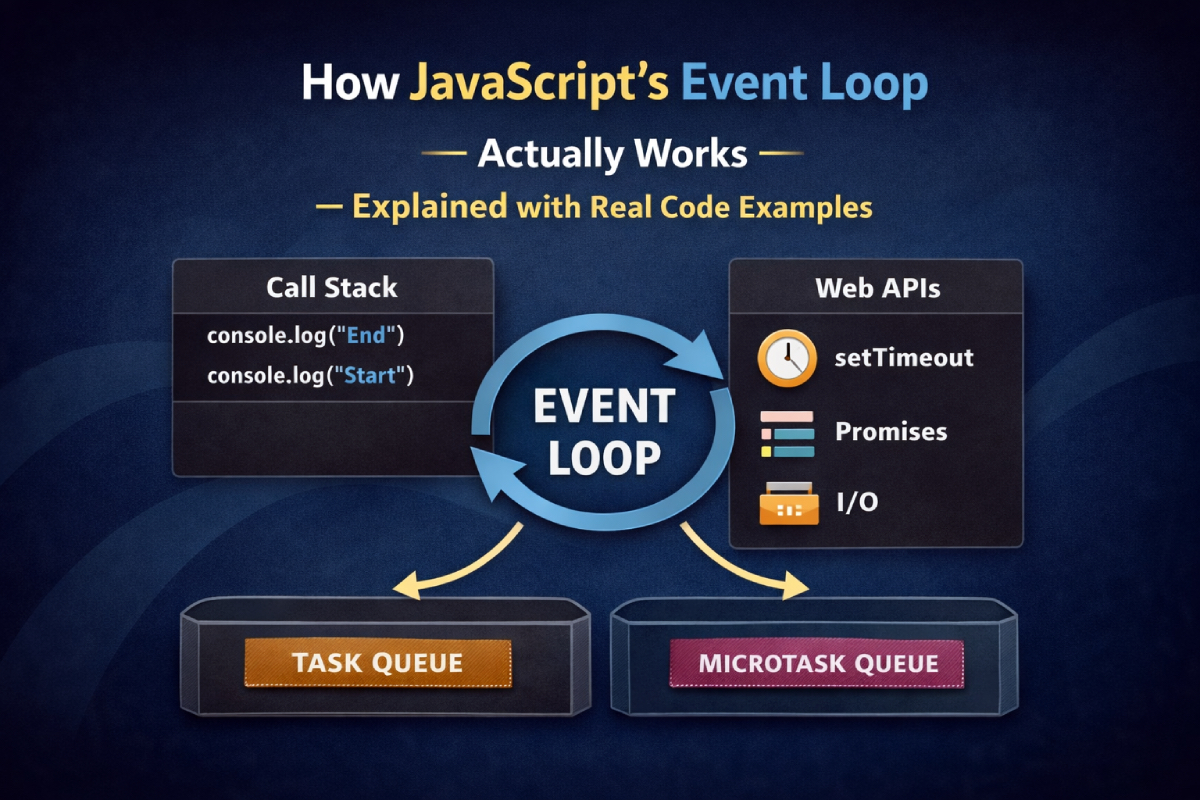
Most people learn that JavaScript is “single-threaded” and assume that means it runs code one line at a time, in order, waiting patiently for each thing to finish before moving on. That’s partially true — but it misses the entire point. Single-threaded means JavaScript has one call stack. It doesn’t mean it can only do one thing at a time. The browser (or Node.js) around it can do many things simultaneously. The event loop is the system that connects JavaScript’s single thread to all that surrounding activity.
2. Event Loop in Javascript – The Building Blocks You Need to Understand First
Before the event loop makes sense, you need a clear picture of three things:
The Call Stack is where your code actually runs. Every time you call a function, it gets pushed onto the stack. When it returns, it gets popped off. It’s a last-in, first-out structure. If the stack is busy, nothing else can run.
The Heap is where objects live in memory. It’s not particularly relevant to timing, but it’s part of the complete picture.
The Task Queue (also called the Callback Queue or Macrotask Queue) is a waiting room. When an asynchronous operation completes — a timer fires, a network response arrives, a user clicks something — its callback doesn’t jump straight into the stack. It waits in this queue until the stack is completely empty.
Here’s the first real code example that made this click for me:
console.log("1 - start");

setTimeout(function () {
  console.log("2 - inside timeout");
}, 0);

console.log("3 - end");
Output:
1 - start
3 - end
2 - inside timeout
Even with a delay of zero milliseconds, the setTimeout callback always runs last. Why? Because setTimeout hands the callback off to the browser’s timer API. Even with 0ms, it still goes through the task queue. And the task queue only gets processed when the call stack is completely empty. By then, lines 1 and 3 have already run.
3. The Event Loop — What It Actually Does
The event loop itself is almost disappointingly simple. Here’s its entire job, described in pseudocode:
while (true) {
  if (callStack is empty) {
    take one task from the task queue
    push it onto the call stack
    run it to completion
  }
}
That’s it. It’s a loop that constantly checks: “Is the call stack empty? Is there something waiting?” If yes to both, it picks up the next task and runs it. The name “event loop” comes from the fact that it loops forever, waiting for events (clicks, timers, responses) to process.
Here’s a more layered example showing this in action:
console.log("start");

setTimeout(function timeoutA() {
  console.log("timeout A");
}, 100);

setTimeout(function timeoutB() {
  console.log("timeout B");
}, 50);

console.log("end");
Output:
start
end
timeout B
timeout A
The two setTimeout calls register their callbacks with the browser. The browser tracks their timers independently. When the stack clears after “end” is logged, the event loop checks the queue. timeoutB fires at 50ms, so it arrives in the queue first. timeoutA arrives later. They’re processed in order of arrival, not in the order they were registered.
4. Event Loop in Node Js – Microtasks vs. Macrotasks The Part That Actually Breaks Things
This is where most developers, myself included, get genuinely tripped up. There are actually two queues, not one. And they have completely different priorities.
Macrotasks (also just called “tasks”) include: setTimeout, setInterval, setImmediate (Node.js), I/O events, UI rendering events.
Microtasks include: Promise callbacks (.then, .catch, .finally), queueMicrotask(), MutationObserver callbacks.
The critical rule is this: after every single macrotask, the engine drains the entire microtask queue before moving on to the next macrotask. Every last microtask. If a microtask adds more microtasks, those run too — before any macrotask gets a turn.
console.log("1");

setTimeout(function () {
  console.log("2 - macrotask");
}, 0);

Promise.resolve().then(function () {
  console.log("3 - microtask");
});

console.log("4");
Output:
1
4
3 - microtask
2 - macrotask
The Promise .then callback runs before the setTimeout callback, even though both were scheduled at roughly the same time. Microtasks always jump the queue ahead of macrotasks.
Here’s a nastier example that has confused every developer I know when they first see it:
setTimeout(function () {
  console.log("timeout");
}, 0);

Promise.resolve()
  .then(function () {
    console.log("promise 1");
    return Promise.resolve();
  })
  .then(function () {
    console.log("promise 2");
  })
  .then(function () {
    console.log("promise 3");
  });

console.log("sync");
Output:
sync
promise 1
promise 2
promise 3
timeout
All three promise callbacks run to completion before the setTimeout gets a single look-in. The microtask queue is fully drained between every macrotask.
5. Promises, async/await, and Where They Fit In
async/await is syntactic sugar over Promises, which means it plays by the same microtask rules. When you awaitsomething, JavaScript suspends that function and returns control to the rest of the synchronous code. When the awaited value resolves, the remainder of the function is queued as a microtask.
async function fetchData() {
  console.log("A - inside async function, before await");
  await Promise.resolve();
  console.log("C - after await (resumes as microtask)");
}

console.log("start");
fetchData();
console.log("B - synchronous, after calling fetchData");
Output:
start
A - inside async function, before await
B - synchronous, after calling fetchData
C - after await (resumes as microtask)
The function runs synchronously up until it hits await. At that point it suspends, hands control back to the call stack, and the synchronous console.log("B") runs. Then the microtask queue kicks in and the function resumes.
A common real-world mistake looks like this:
// Wrong — this blocks the event loop for a long time
async function processLargeList(items) {
  for (const item of items) {
    heavyComputation(item); // takes 5ms each, 10,000 items = 50 seconds blocked
  }
}

// Better — yield control back to the event loop periodically
async function processLargeList(items) {
  for (const item of items) {
    heavyComputation(item);
    await new Promise(resolve => setTimeout(resolve, 0)); // let the loop breathe
  }
}
The second version uses a setTimeout(resolve, 0) trick to intentionally yield back to the event loop between iterations. This gives the browser a chance to handle user input, repaint the screen, and generally stay responsive.
6. Common Pitfalls — Mistakes I’ve Made (So You Don’t Have To)
Pitfall 1: Treating async functions as synchronous
// This is wrong
function getData() {
  let result;
  fetch("/api/data").then(res => res.json()).then(data => {
    result = data; // too late — getData() already returned
  });
  return result; // always undefined
}

// This is right
async function getData() {
  const res = await fetch("/api/data");
  return await res.json();
}
You cannot pull data out of an asynchronous operation synchronously. The result simply isn’t there yet.
Pitfall 2: Blocking the event loop with heavy synchronous code
// This freezes the entire UI for however long it takes
function computePrimes(limit) {
  const primes = [];
  for (let n = 2; n < limit; n++) {
    let isPrime = true;
    for (let i = 2; i < n; i++) {
      if (n % i === 0) { isPrime = false; break; }
    }
    if (isPrime) primes.push(n);
  }
  return primes;
}

computePrimes(500000); // the page is unresponsive until this finishes
Because JavaScript is single-threaded, a long synchronous operation — a huge loop, heavy JSON parsing, complex DOM manipulation — blocks everything. No clicks are processed. No animations run. The page appears frozen. For truly heavy work, use a Web Worker to offload computation to a separate thread.
Pitfall 3: Creating infinite microtask loops
// Don't do this — it will never yield to the macrotask queue
function loop() {
  Promise.resolve().then(loop);
}
loop();
Because microtasks drain completely before any macrotask runs, this creates an infinite microtask loop that starves the task queue entirely. setTimeout callbacks will never run. The browser will grind to a halt. If you need a recurring operation, use setTimeout or requestAnimationFrame, which are macrotasks and naturally yield control back.
Pitfall 4: Misunderstanding setTimeout’s guarantee
setTimeout(fn, 100) does not guarantee fn runs in exactly 100ms. It guarantees fn won’t run before 100ms. If the call stack is busy with a 10-second synchronous operation when the 100ms timer fires, the callback waits. It runs when the stack is next empty — which might be much longer than 100ms.
setTimeout(function () {
  console.log("This runs late");
}, 100);

// Blocks the event loop for 3 seconds
const start = Date.now();
while (Date.now() - start < 3000) {} // synchronous busy-wait

console.log("Sync done"); // runs after 3 seconds
// setTimeout callback runs AFTER this, not at 100ms
7. Performance Tips and Scalability Considerations
Break up long tasks. If you have work that takes more than 50ms, consider chunking it. Use setTimeout(fn, 0) or scheduler.postTask() (in modern browsers) to split work across multiple event loop turns.
Use Web Workers for CPU-heavy work. Web Workers run in a completely separate thread with their own event loop. They can’t touch the DOM, but they’re perfect for heavy computation. Communication happens via postMessage, which lands in the main thread’s task queue.
// main.js
const worker = new Worker("worker.js");
worker.postMessage({ limit: 500000 });
worker.onmessage = function (e) {
  console.log("Primes computed:", e.data.length);
};

// worker.js
self.onmessage = function (e) {
  const primes = computePrimes(e.data.limit);
  self.postMessage(primes);
};
Prefer requestAnimationFrame for animations. It ties your animation updates to the browser’s repaint cycle (typically 60fps). Using setTimeout or setInterval for animations can cause jank because they’re not synchronized with the rendering pipeline.
Avoid deep Promise chains where a flat async/await would do. Heavily nested .then() chains aren’t more efficient than async/await — they’re just harder to read. And readability directly affects your ability to reason about timing bugs.
Be careful with setInterval under heavy load. If your interval callback takes longer than the interval duration, callbacks can pile up in the task queue. Either use setTimeout recursively (schedule the next call at the end of each execution), or check how much time has passed before rescheduling.
// Safer pattern for recurring work
function runRecurring() {
  doSomeWork();
  setTimeout(runRecurring, 1000); // schedules next run after current one finishes
}
setTimeout(runRecurring, 1000);
8. Putting It All Together — The Mental Model That Finally Stuck
After all the examples, mistakes, and late-night debugging sessions, here’s the mental model I use every day:
- Synchronous code runs first. Always. No exceptions.
- When a Web API (timer, fetch, event listener) completes, its callback goes into the task queue.
- Promise callbacks go into the microtask queue — which has higher priority.
- The event loop waits for the call stack to empty, then drains the entire microtask queue, then processes one macrotask, then drains microtasks again, and so on.
- If you’re blocking the call stack for a long time, everything else waits. User input. Animations. Timer callbacks. Everything.
The event loop isn’t magic. It’s a straightforward scheduling system. Once you internalize the priority order — synchronous → microtasks → macrotasks — most confusing async behavior suddenly makes complete sense.
The best way to really cement this? Take the code examples in this article, open your browser’s console, and run them. Then modify them. Add more .then() calls. Nest some setTimeout inside a Promise. Watch what order things come out. There’s no substitute for the moment you predict the output correctly and it matches — that’s when you know you’ve actually got it.
Event Loop Official Documentation:
Read More: